Generating a Code 39 barcode with Python
pyStrich is a Python library for generating Code 39 barcodes, along with other 1D and 2D symbologies.
Code 39 barcodes are widely used for industrial labelling. The default
character set is uppercase letters, digits, space and -.$/+%; pass
full_ascii=True to encode any 7-bit character as a pair of symbols.
Code39Encoder("17 E North 32 St", full_ascii=True).save("code39-address.png")
See also
Code 39 on Wikipedia for background on the symbology itself.
Code 39 barcodes are defined in ISO/IEC 16388.
Example
If you haven’t already installed pyStrich, you should do so – see Installation for more detail:
$ pip install pyStrich
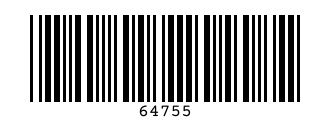
Here’s how to generate a Code 39 barcode and save it as an SVG:
from pystrich.code39 import Code39Encoder

encoder = Code39Encoder("64755")
encoder.save_svg("code39-example.svg")
Sizing, label, font and layout
The bar_width argument to save() and
get_imagedata() sets the pixel width of the narrowest
bar (default 3).
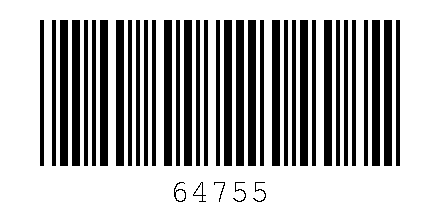
The options dict passed to Code39Encoder controls the
human-readable label and the surrounding layout. All keys are optional.
show_labelWhether to render the human-readable label underneath the bars. Defaults to
True; set toFalseto suppress it.ttf_fontAbsolute path to a TrueType font file used for the label. Defaults to a bundled bitmap font if unset.
ttf_fontsizeFont size in points.
heightTotal image height in pixels. Defaults to
120.label_borderPixels of vertical space between the bars and the label.
bottom_borderPixels of vertical space between the label and the bottom edge.
See also
Printing barcodes for guidance on selecting bar_width for printed
output.
options = {
    "height": 200,
    "label_border": 10,
    "bottom_border": 10,
    "ttf_fontsize": 24,
    # "ttf_font": "/usr/share/fonts/truetype/dejavu/DejaVuSans.ttf",
}
encoder = Code39Encoder("64755", options=options)
encoder.save("code39-custom.png", bar_width=4)
Output formats
SVG output
For embedding in web pages or any workflow that benefits from
resolution-independent output, use save_svg() (or
get_svg() to receive the SVG as a string).
Code39Encoder("64755").save_svg("code39.svg")
The SVG’s viewBox is in module units (one narrow bar = one unit), while
width and height scale by bar_width. The 10-module quiet zones
mandated by the standard are applied automatically on each side.
Added in version 0.12.
PNG output
For raster output, use save() to write a PNG file or
get_imagedata() to receive the raw PNG bytes.
Code39Encoder("64755").save("code39.png")
EPS output
For embedding in LaTeX (\includegraphics) or other vector print
workflows, use save_eps() (or
get_eps() to receive the EPS as a string).
Code39Encoder("64755").save_eps("code39.eps")
The bar_width argument is the width of the narrowest bar in PostScript
points (1 point = 1/72 inch). The 10-module quiet zones are applied
automatically.
Added in version 0.12.
API
- class Code39Encoder(text: str, full_ascii: bool = False, options: BarcodeRenderOptions | None = None)[source]
Bases:
Bar1DEncoderEncode a string as a Code 39 1D barcode.
By default only the standard Code 39 character set is accepted (
0-9,A-Z, space, and-.$/+%). Passfull_ascii=Trueto use the Full ASCII extension, which encodes any 7-bit character via paired symbols.Typical use:
encoder = Code39Encoder("ABC-123")
encoder.save("barcode.png")
- Variables:
text – The original input text.
encoded_text – List of code values produced by the text encoder.
bars – The bar/space pattern as a string of
"1"and"0".options – Render-time options dict (empty if none were supplied).
width – Pixel width of the most recently rendered image.
height – Pixel height of the most recently rendered image.
- get_eps(bar_width: int = 3, *, dark_hex: str | RGBA | None = None, light_hex: str | RGBA | None = None) str[source]
Render the barcode and return EPS markup.
- Parameters:
bar_width – Width in PostScript points of the narrowest bar.
dark_hex – Bar and text colour as a 3-, 6- or 8-digit hex string or an
RGBA. Defaults to black.light_hex – Background colour as a 3-, 6- or 8-digit hex string or an
RGBA, opaque. Defaults to white.
- Return type:
Added in version 0.12.
Changed in version 0.16: Added
dark_hexandlight_hex.
- get_imagedata(bar_width: int = 3, *, dark_hex: str | RGBA | None = None, light_hex: str | RGBA | None = None) bytes[source]
Render the barcode and return PNG bytes.
- Parameters:
bar_width – Width in pixels of the narrowest bar.
dark_hex – Bar and text colour as a 3-, 6- or 8-digit hex string or an
RGBA. Defaults to black.light_hex – Background colour as a 3-, 6- or 8-digit hex string or an
RGBA. Defaults to white.
- Returns:
PNG-encoded image data.
- Return type:
Changed in version 0.16: Added
dark_hexandlight_hex.
- get_pilimage(bar_width: int = 3, *, dark_hex: str | RGBA | None = None, light_hex: str | RGBA | None = None) PILImage[source]
Render the barcode and return a Pillow image.
- Parameters:
bar_width – Width in pixels of the narrowest bar.
dark_hex – Bar and text colour as a 3-, 6- or 8-digit hex string or an
RGBA. Defaults to black.light_hex – Background colour as a 3-, 6- or 8-digit hex string or an
RGBA. Defaults to white.
- Returns:
The rendered barcode.
- Return type:
Added in version 0.11.
Changed in version 0.16: Added
dark_hexandlight_hex.
- get_rect_marks() SymbolMarks[source]
Return the barcode’s dark bars as rectangles in layout units.
- Return type:
Added in version 0.18.
- get_svg(bar_width: int = 3, *, dark_hex: str | RGBA | None = None, light_hex: str | RGBA | None = None) str[source]
Render the barcode and return SVG markup.
- Parameters:
bar_width – Width in user units of the narrowest bar.
dark_hex – Bar and text colour as a 3-, 6- or 8-digit hex string or an
RGBA. Defaults to black.light_hex – Background colour as a 3-, 6- or 8-digit hex string or an
RGBA. Defaults to white.
- Return type:
Added in version 0.12.
Changed in version 0.16: Added
dark_hexandlight_hex.
- png_dataurl(bar_width: int = 3, *, dark_hex: str | RGBA | None = None, light_hex: str | RGBA | None = None) str[source]
Render the barcode and return a PNG
data:URL string.- Parameters:
bar_width – Width in pixels of the narrowest bar.
dark_hex – Bar and text colour as a 3-, 6- or 8-digit hex string or an
RGBA. Defaults to black.light_hex – Background colour as a 3-, 6- or 8-digit hex string or an
RGBA. Defaults to white.
- Return type:
Added in version 0.15.
Changed in version 0.16: Added
dark_hexandlight_hex.
- save(filename: str | os.PathLike[str], bar_width: int = 3, *, dark_hex: str | RGBA | None = None, light_hex: str | RGBA | None = None) None[source]
Render the barcode to a PNG file.
- Parameters:
filename – Path to write the PNG to.
bar_width – Width in pixels of the narrowest bar.
dark_hex – Bar and text colour as a 3-, 6- or 8-digit hex string or an
RGBA. Defaults to black.light_hex – Background colour as a 3-, 6- or 8-digit hex string or an
RGBA. Defaults to white.
Changed in version 0.16: Added
dark_hexandlight_hex.
- save_eps(filename: str | os.PathLike[str], bar_width: int = 3, *, dark_hex: str | RGBA | None = None, light_hex: str | RGBA | None = None) None[source]
Save the barcode as an EPS file. Pass an
.epsfilename.- Parameters:
filename – EPS output path.
bar_width – Width in PostScript points of the narrowest bar.
dark_hex – Bar and text colour as a 3-, 6- or 8-digit hex string or an
RGBA. Defaults to black.light_hex – Background colour as a 3-, 6- or 8-digit hex string or an
RGBA, opaque. Defaults to white.
Added in version 0.12.
Changed in version 0.16: Added
dark_hexandlight_hex.
- save_svg(filename: str | os.PathLike[str], bar_width: int = 3, *, dark_hex: str | RGBA | None = None, light_hex: str | RGBA | None = None) None[source]
Save the barcode as an SVG file. Pass a
.svgfilename.- Parameters:
filename – SVG output path.
bar_width – Width in user units of the narrowest bar.
dark_hex – Bar and text colour as a 3-, 6- or 8-digit hex string or an
RGBA. Defaults to black.light_hex – Background colour as a 3-, 6- or 8-digit hex string or an
RGBA. Defaults to white.
Added in version 0.12.
Changed in version 0.16: Added
dark_hexandlight_hex.
- svg_dataurl(bar_width: int = 3, *, dark_hex: str | RGBA | None = None, light_hex: str | RGBA | None = None) str[source]
Render the barcode and return an SVG
data:URL string.- Parameters:
bar_width – Width in user units of the narrowest bar.
dark_hex – Bar and text colour as a 3-, 6- or 8-digit hex string or an
RGBA. Defaults to black.light_hex – Background colour as a 3-, 6- or 8-digit hex string or an
RGBA. Defaults to white.
- Return type:
Added in version 0.15.
Changed in version 0.16: Added
dark_hexandlight_hex.