Generating an EAN-13 barcode with Python
pyStrich is a Python library for generating EAN-13 barcodes, along with other 1D and 2D symbologies.
EAN-13 is the retail product barcode for a GTIN-13 – the 13-digit global identifier issued by GS1 and printed on virtually every consumer product. Pass either 12 digits (the check digit will be computed and appended) or 13 digits (the final digit is treated as a check digit and recomputed).
See also
International Article Number on Wikipedia for background on the symbology itself.
EAN-13 is defined in ISO/IEC 15420.
Warning
Real-world EAN-13 codes must be allocated by GS1 to your organisation;
you cannot simply invent one. Inventing a code will produce a scannable
barcode, but it will collide with – or be rejected by – retailer
product databases. The number used in this page’s examples,
5050070007664, is the GTIN of a real product (a DVD of Road House).
Input must be exactly 12 or 13 digits, ASCII 0-9. Anything else
raises PyStrichInvalidPayloadLength. The human-readable
label below the bars is mandated by the EAN-13 specification and always
rendered; the only customisation hook is the cosmetic
EAN13RenderOptions dict (see Sizing, label, font and layout below).
The check digit is always computed by pyStrich; pass either 12 digits (it is appended) or 13 digits (the supplied final digit is discarded and recomputed):
>>> from pystrich.ean13 import EAN13Encoder
>>> EAN13Encoder("505007000766").full_code
'5050070007664'
>>> EAN13Encoder("5050070007660").full_code
'5050070007664'
Example
If you haven’t already installed pyStrich, you should do so – see Installation for more detail:
$ pip install pyStrich
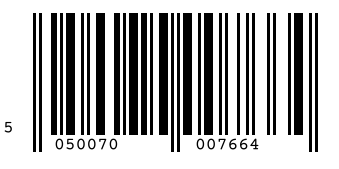
Here’s how to generate an EAN-13 barcode and save it as an SVG:
from pystrich.ean13 import EAN13Encoder

encoder = EAN13Encoder("5050070007664")
encoder.save_svg("ean13-example.svg")
Sizing, label, font and layout
The bar_width argument to save() and
get_imagedata() sets the pixel width of the narrowest
bar (default 3).
The GS1 specification mandates an asymmetric quiet zone (white space) of 11 modules on the left and 7 modules on the right of the symbol; pyStrich renders this automatically and it is not configurable. If you composite the saved PNG into another image, do not crop into the white margin or retail scanners may fail to read the symbol.
Changed in version 0.11: The quiet zone was previously 9 modules on each side, which is below spec on the left.
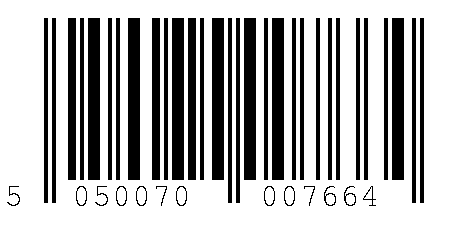
By default pyStrich draws the leading number-system digit slightly higher
than the two main digit groups. To draw all three groups on a level baseline
instead, pass an options dict with first_digit_y_offset set to 0:
The value is the gap between the first digit and the others, expressed as
a fraction of image height. 0.1 (the default) preserves the classic
look; 0 aligns all three groups.
Added in version 0.11: The options dict and first_digit_y_offset key.
See also
Printing barcodes for guidance on selecting bar_width for printed
output.
encoder = EAN13Encoder(
    "5050070007664", options={"first_digit_y_offset": 0}
)
encoder.save("ean13-level.png", bar_width=4)
Output formats
SVG output
For embedding in web pages or any workflow that benefits from
resolution-independent output, use save_svg() (or
get_svg() to receive the SVG as a string).
EAN13Encoder("5050070007664").save_svg("ean13.svg")
The SVG’s viewBox is in module units, while width and height
scale by bar_width. The 11-module left and 7-module right quiet zones
required by GS1 are applied automatically. Guard bars extend 5 modules
below the data-bar baseline, also per the GS1 General Specifications.
Added in version 0.12.
PNG output
For raster output, use save() to write a PNG file or
get_imagedata() to receive the raw PNG bytes.
EAN13Encoder("5050070007664").save("ean13.png")
EPS output
For embedding in LaTeX (\includegraphics) or other vector print
workflows, use save_eps() (or
get_eps() to receive the EPS as a string).
EAN13Encoder("5050070007664").save_eps("ean13.eps")
The bar_width argument is the width of the narrowest bar in PostScript
points (1 point = 1/72 inch). The GS1 quiet zones (11 modules left, 7
modules right) and the 5-module guard-bar offset are applied
automatically.
Added in version 0.12.
API
- class EAN13Encoder(code: str, options: EAN13RenderOptions | None = None, *, require_valid_check_digit: bool = False)[source]
Bases:
Bar1DEncoderEncode a 12- or 13-digit code as an EAN-13 1D barcode.
The check digit is computed for you. If a 13-digit code is supplied, its final digit is discarded and recomputed.
Typical use:
encoder = EAN13Encoder("012345678901")
encoder.save("ean13.png")
- Variables:
code – The 12-digit input (number system + manufacturer + product).
check_digit – The computed mod-10 check digit.
full_code – The 13-digit code including check digit.
left_bars – Bar pattern for the left half of the symbol.
right_bars – Bar pattern for the right half.
options – Render-time options dict (empty if none were supplied).
width – Pixel width of the most recently rendered image.
height – Pixel height of the most recently rendered image.
- get_eps(bar_width: int = 3, *, dark_hex: str | RGBA | None = None, light_hex: str | RGBA | None = None) str[source]
Render the barcode and return EPS markup.
- Parameters:
bar_width – Width in PostScript points of the narrowest bar.
dark_hex – Bar and text colour as a 3-, 6- or 8-digit hex string or an
RGBA. Defaults to black.light_hex – Background colour as a 3-, 6- or 8-digit hex string or an
RGBA, opaque. Defaults to white.
- Return type:
Added in version 0.12.
Changed in version 0.16: Added
dark_hexandlight_hex.
- get_imagedata(bar_width: int = 3, *, dark_hex: str | RGBA | None = None, light_hex: str | RGBA | None = None) bytes[source]
Render the barcode and return PNG bytes.
- Parameters:
bar_width – Width in pixels of the narrowest bar.
dark_hex – Bar and text colour as a 3-, 6- or 8-digit hex string or an
RGBA. Defaults to black.light_hex – Background colour as a 3-, 6- or 8-digit hex string or an
RGBA. Defaults to white.
- Returns:
PNG-encoded image data.
- Return type:
Changed in version 0.16: Added
dark_hexandlight_hex.
- get_pilimage(bar_width: int = 3, *, dark_hex: str | RGBA | None = None, light_hex: str | RGBA | None = None) PILImage[source]
Render the barcode and return a Pillow image.
- Parameters:
bar_width – Width in pixels of the narrowest bar.
dark_hex – Bar and text colour as a 3-, 6- or 8-digit hex string or an
RGBA. Defaults to black.light_hex – Background colour as a 3-, 6- or 8-digit hex string or an
RGBA. Defaults to white.
- Returns:
The rendered barcode.
- Return type:
Added in version 0.11.
Changed in version 0.16: Added
dark_hexandlight_hex.
- get_rect_marks() SymbolMarks[source]
Return the barcode’s dark bars as rectangles in layout units.
- Return type:
Added in version 0.18.
- get_svg(bar_width: int = 3, *, dark_hex: str | RGBA | None = None, light_hex: str | RGBA | None = None) str[source]
Render the barcode and return SVG markup.
- Parameters:
bar_width – Width in user units of the narrowest bar.
dark_hex – Bar and text colour as a 3-, 6- or 8-digit hex string or an
RGBA. Defaults to black.light_hex – Background colour as a 3-, 6- or 8-digit hex string or an
RGBA. Defaults to white.
- Return type:
Added in version 0.12.
Changed in version 0.16: Added
dark_hexandlight_hex.
- png_dataurl(bar_width: int = 3, *, dark_hex: str | RGBA | None = None, light_hex: str | RGBA | None = None) str[source]
Render the barcode and return a PNG
data:URL string.- Parameters:
bar_width – Width in pixels of the narrowest bar.
dark_hex – Bar and text colour as a 3-, 6- or 8-digit hex string or an
RGBA. Defaults to black.light_hex – Background colour as a 3-, 6- or 8-digit hex string or an
RGBA. Defaults to white.
- Return type:
Added in version 0.15.
Changed in version 0.16: Added
dark_hexandlight_hex.
- save(filename: str | os.PathLike[str], bar_width: int = 3, *, dark_hex: str | RGBA | None = None, light_hex: str | RGBA | None = None) None[source]
Render the barcode to a PNG file.
- Parameters:
filename – Path to write the PNG to.
bar_width – Width in pixels of the narrowest bar.
dark_hex – Bar and text colour as a 3-, 6- or 8-digit hex string or an
RGBA. Defaults to black.light_hex – Background colour as a 3-, 6- or 8-digit hex string or an
RGBA. Defaults to white.
Changed in version 0.16: Added
dark_hexandlight_hex.
- save_eps(filename: str | os.PathLike[str], bar_width: int = 3, *, dark_hex: str | RGBA | None = None, light_hex: str | RGBA | None = None) None[source]
Save the barcode as an EPS file. Pass an
.epsfilename.- Parameters:
filename – EPS output path.
bar_width – Width in PostScript points of the narrowest bar.
dark_hex – Bar and text colour as a 3-, 6- or 8-digit hex string or an
RGBA. Defaults to black.light_hex – Background colour as a 3-, 6- or 8-digit hex string or an
RGBA, opaque. Defaults to white.
Added in version 0.12.
Changed in version 0.16: Added
dark_hexandlight_hex.
- save_svg(filename: str | os.PathLike[str], bar_width: int = 3, *, dark_hex: str | RGBA | None = None, light_hex: str | RGBA | None = None) None[source]
Save the barcode as an SVG file. Pass a
.svgfilename.- Parameters:
filename – SVG output path.
bar_width – Width in user units of the narrowest bar.
dark_hex – Bar and text colour as a 3-, 6- or 8-digit hex string or an
RGBA. Defaults to black.light_hex – Background colour as a 3-, 6- or 8-digit hex string or an
RGBA. Defaults to white.
Added in version 0.12.
Changed in version 0.16: Added
dark_hexandlight_hex.
- svg_dataurl(bar_width: int = 3, *, dark_hex: str | RGBA | None = None, light_hex: str | RGBA | None = None) str[source]
Render the barcode and return an SVG
data:URL string.- Parameters:
bar_width – Width in user units of the narrowest bar.
dark_hex – Bar and text colour as a 3-, 6- or 8-digit hex string or an
RGBA. Defaults to black.light_hex – Background colour as a 3-, 6- or 8-digit hex string or an
RGBA. Defaults to white.
- Return type:
Added in version 0.15.
Changed in version 0.16: Added
dark_hexandlight_hex.
- encode() tuple[str, str][source]
Encode the barcode number and return the left and right data strings
- get_parity() tuple[int, int, int, int, int, int][source]
Return the parity mappings applicable to this code
- class EAN13RenderOptions[source]
Bases:
TypedDictOptional render-time tweaks for EAN-13 barcodes.
The label layout in EAN-13 is fixed by the standard, so this is a small set of cosmetic toggles. All keys are optional; omitted keys fall back to library defaults.
Added in version 0.11.
- height: int
Total image height in pixels (= user units for SVG/EPS at default DPI). Defaults to half the symbol’s pixel width.
Added in version 0.12.
- first_digit_y_offset: float
How far above the other text the first digit sits, as a fraction of image height. Defaults to
0.1(the long-standing pyStrich look, where the leading number-system digit sits slightly higher than the two main digit groups). Set to0for a level baseline across all three groups.