Generating an ITF-14 barcode with Python
pyStrich is a Python library for generating ITF-14 barcodes, along with other 1D and 2D symbologies.
Added in version 0.16: ITF-14 and Interleaved 2 of 5 support were added in this release.
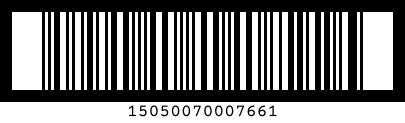
ITF-14 is the GS1 barcode for a GTIN-14 – the 14-digit identifier printed on shipping cartons and cases rather than on the retail item inside. It is an application of Interleaved 2 of 5 (ITF), which packs pairs of digits into alternating bars and spaces, wrapped in a bearer bar that frames the symbol. Pass either 13 digits (the check digit is computed and appended) or 14 digits (the final digit is treated as a check digit and recomputed).
See also
Interleaved 2 of 5 on Wikipedia for background on the symbology.
Interleaved 2 of 5 barcodes are defined in ISO/IEC 16390.
Warning
Real-world GTIN-14 codes are derived from a GS1-allocated GTIN; you cannot simply invent one.
Input must be exactly 13 or 14 digits, ASCII 0-9. Anything else raises
PyStrichInvalidPayloadLength. The 14-digit human-readable
label below the bars is rendered by default (see Label to suppress it).
The check digit is always computed by pyStrich; pass either 13 digits (it is appended) or 14 digits (the supplied final digit is discarded and recomputed):
>>> from pystrich.itf import ITF14Encoder
>>> ITF14Encoder("1505007000766").full_code
'15050070007661'
>>> ITF14Encoder("15050070007660").full_code
'15050070007661'
Example
If you haven’t already installed pyStrich, you should do so – see Installation for more detail:
$ pip install pyStrich
Here’s how to generate an ITF-14 barcode and save it as an SVG:
from pystrich.itf import ITF14Encoder

encoder = ITF14Encoder("1505007000766")
encoder.save_svg("itf14-example.svg")
Bearer bar
ITF-14 is drawn with a full-frame bearer bar – the heavy border enclosing the
symbol. It reduces the chance of a partial scan being
misread as a short, valid code. Its thickness defaults to 4 narrow-bar widths;
adjust it with the bearer_width key of ITFRenderOptions (set it to
0 to omit the bearer):
ITF14Encoder("1505007000766", options={"bearer_width": 6}).save("itf14.png")
Label
The human-readable label is rendered by default. To lay out your own instead,
suppress it with show_label:
ITF14Encoder("1505007000766", options={"show_label": False}).save("itf14.png")
Interleaved 2 of 5
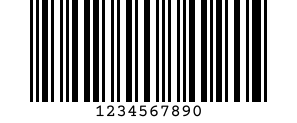
For a plain Interleaved 2 of 5 symbol – any even number of digits – use
ITFEncoder directly. It has no bearer bar by
default, but accepts the same bearer_width option.
from pystrich.itf import ITFEncoder

ITFEncoder("1234567890").save_svg("itf-example.svg")
Output formats
Like the other 1D symbologies, ITF-14 renders to SVG
(save_svg()), PNG
(save()) and EPS
(save_eps()). The bar_width argument sets
the width of the narrowest bar.
See also
Printing barcodes for guidance on selecting bar_width for printed output.
API
- class ITF14Encoder(code: str, options: ITFRenderOptions | None = None, *, require_valid_check_digit: bool = False)[source]
Bases:
ITFEncoderEncode a 13- or 14-digit code as an ITF-14 (GTIN-14) barcode.
The check digit is computed for you. If a 14-digit code is supplied, its final digit is discarded and recomputed. The symbol is framed by a bearer bar unless
bearer_widthis overridden inoptions.Typical use:
encoder = ITF14Encoder("1540141453698")
encoder.save("itf14.png")
- Variables:
check_digit – The computed mod-10 check digit.
full_code – The 14-digit code including check digit (==
digits).
- get_eps(bar_width: int = 3, *, dark_hex: str | RGBA | None = None, light_hex: str | RGBA | None = None) str[source]
Render the barcode and return EPS markup.
- Parameters:
bar_width – Width in PostScript points of the narrowest bar.
dark_hex – Bar and text colour as a 3-, 6- or 8-digit hex string or an
RGBA. Defaults to black.light_hex – Background colour as a 3-, 6- or 8-digit hex string or an
RGBA, opaque. Defaults to white.
- Return type:
- get_imagedata(bar_width: int = 3, *, dark_hex: str | RGBA | None = None, light_hex: str | RGBA | None = None) bytes[source]
Render the barcode and return PNG bytes.
- Parameters:
bar_width – Width in pixels of the narrowest bar.
dark_hex – Bar and text colour as a 3-, 6- or 8-digit hex string or an
RGBA. Defaults to black.light_hex – Background colour as a 3-, 6- or 8-digit hex string or an
RGBA. Defaults to white.
- Returns:
PNG-encoded image data.
- Return type:
- get_pilimage(bar_width: int = 3, *, dark_hex: str | RGBA | None = None, light_hex: str | RGBA | None = None) PILImage[source]
Render the barcode and return a Pillow image.
- Parameters:
bar_width – Width in pixels of the narrowest bar.
dark_hex – Bar and text colour as a 3-, 6- or 8-digit hex string or an
RGBA. Defaults to black.light_hex – Background colour as a 3-, 6- or 8-digit hex string or an
RGBA. Defaults to white.
- Returns:
The rendered barcode.
- Return type:
- get_rect_marks() SymbolMarks[source]
Return the barcode’s dark bars as rectangles in layout units.
- Return type:
Added in version 0.18.
- get_svg(bar_width: int = 3, *, dark_hex: str | RGBA | None = None, light_hex: str | RGBA | None = None) str[source]
Render the barcode and return SVG markup.
- Parameters:
bar_width – Width in user units of the narrowest bar.
dark_hex – Bar and text colour as a 3-, 6- or 8-digit hex string or an
RGBA. Defaults to black.light_hex – Background colour as a 3-, 6- or 8-digit hex string or an
RGBA. Defaults to white.
- Return type:
- png_dataurl(bar_width: int = 3, *, dark_hex: str | RGBA | None = None, light_hex: str | RGBA | None = None) str[source]
Render the barcode and return a PNG
data:URL string.- Parameters:
bar_width – Width in pixels of the narrowest bar.
dark_hex – Bar and text colour as a 3-, 6- or 8-digit hex string or an
RGBA. Defaults to black.light_hex – Background colour as a 3-, 6- or 8-digit hex string or an
RGBA. Defaults to white.
- Return type:
- save(filename: str | os.PathLike[str], bar_width: int = 3, *, dark_hex: str | RGBA | None = None, light_hex: str | RGBA | None = None) None[source]
Render the barcode to a PNG file.
- Parameters:
filename – Path to write the PNG to.
bar_width – Width in pixels of the narrowest bar.
dark_hex – Bar and text colour as a 3-, 6- or 8-digit hex string or an
RGBA. Defaults to black.light_hex – Background colour as a 3-, 6- or 8-digit hex string or an
RGBA. Defaults to white.
- save_eps(filename: str | os.PathLike[str], bar_width: int = 3, *, dark_hex: str | RGBA | None = None, light_hex: str | RGBA | None = None) None[source]
Save the barcode as an EPS file. Pass an
.epsfilename.- Parameters:
filename – EPS output path.
bar_width – Width in PostScript points of the narrowest bar.
dark_hex – Bar and text colour as a 3-, 6- or 8-digit hex string or an
RGBA. Defaults to black.light_hex – Background colour as a 3-, 6- or 8-digit hex string or an
RGBA, opaque. Defaults to white.
- save_svg(filename: str | os.PathLike[str], bar_width: int = 3, *, dark_hex: str | RGBA | None = None, light_hex: str | RGBA | None = None) None[source]
Save the barcode as an SVG file. Pass a
.svgfilename.- Parameters:
filename – SVG output path.
bar_width – Width in user units of the narrowest bar.
dark_hex – Bar and text colour as a 3-, 6- or 8-digit hex string or an
RGBA. Defaults to black.light_hex – Background colour as a 3-, 6- or 8-digit hex string or an
RGBA. Defaults to white.
- svg_dataurl(bar_width: int = 3, *, dark_hex: str | RGBA | None = None, light_hex: str | RGBA | None = None) str[source]
Render the barcode and return an SVG
data:URL string.- Parameters:
bar_width – Width in user units of the narrowest bar.
dark_hex – Bar and text colour as a 3-, 6- or 8-digit hex string or an
RGBA. Defaults to black.light_hex – Background colour as a 3-, 6- or 8-digit hex string or an
RGBA. Defaults to white.
- Return type:
- class ITFEncoder(digits: str, options: ITFRenderOptions | None = None)[source]
Bases:
Bar1DEncoderEncode an even-length string of digits as an Interleaved 2 of 5 barcode.
Typical use:
encoder = ITFEncoder("1234567890")
encoder.save("itf.png")
- Variables:
digits – The digits being encoded.
bars – The bar/space pattern as a string of
"1"and"0".options – Render-time options dict (empty if none were supplied).
width – Pixel width of the most recently rendered image.
height – Pixel height of the most recently rendered image.
- get_eps(bar_width: int = 3, *, dark_hex: str | RGBA | None = None, light_hex: str | RGBA | None = None) str[source]
Render the barcode and return EPS markup.
- Parameters:
bar_width – Width in PostScript points of the narrowest bar.
dark_hex – Bar and text colour as a 3-, 6- or 8-digit hex string or an
RGBA. Defaults to black.light_hex – Background colour as a 3-, 6- or 8-digit hex string or an
RGBA, opaque. Defaults to white.
- Return type:
- get_imagedata(bar_width: int = 3, *, dark_hex: str | RGBA | None = None, light_hex: str | RGBA | None = None) bytes[source]
Render the barcode and return PNG bytes.
- Parameters:
bar_width – Width in pixels of the narrowest bar.
dark_hex – Bar and text colour as a 3-, 6- or 8-digit hex string or an
RGBA. Defaults to black.light_hex – Background colour as a 3-, 6- or 8-digit hex string or an
RGBA. Defaults to white.
- Returns:
PNG-encoded image data.
- Return type:
- get_pilimage(bar_width: int = 3, *, dark_hex: str | RGBA | None = None, light_hex: str | RGBA | None = None) PILImage[source]
Render the barcode and return a Pillow image.
- Parameters:
bar_width – Width in pixels of the narrowest bar.
dark_hex – Bar and text colour as a 3-, 6- or 8-digit hex string or an
RGBA. Defaults to black.light_hex – Background colour as a 3-, 6- or 8-digit hex string or an
RGBA. Defaults to white.
- Returns:
The rendered barcode.
- Return type:
- get_rect_marks() SymbolMarks[source]
Return the barcode’s dark bars as rectangles in layout units.
- Return type:
Added in version 0.18.
- get_svg(bar_width: int = 3, *, dark_hex: str | RGBA | None = None, light_hex: str | RGBA | None = None) str[source]
Render the barcode and return SVG markup.
- Parameters:
bar_width – Width in user units of the narrowest bar.
dark_hex – Bar and text colour as a 3-, 6- or 8-digit hex string or an
RGBA. Defaults to black.light_hex – Background colour as a 3-, 6- or 8-digit hex string or an
RGBA. Defaults to white.
- Return type:
- png_dataurl(bar_width: int = 3, *, dark_hex: str | RGBA | None = None, light_hex: str | RGBA | None = None) str[source]
Render the barcode and return a PNG
data:URL string.- Parameters:
bar_width – Width in pixels of the narrowest bar.
dark_hex – Bar and text colour as a 3-, 6- or 8-digit hex string or an
RGBA. Defaults to black.light_hex – Background colour as a 3-, 6- or 8-digit hex string or an
RGBA. Defaults to white.
- Return type:
- save(filename: str | os.PathLike[str], bar_width: int = 3, *, dark_hex: str | RGBA | None = None, light_hex: str | RGBA | None = None) None[source]
Render the barcode to a PNG file.
- Parameters:
filename – Path to write the PNG to.
bar_width – Width in pixels of the narrowest bar.
dark_hex – Bar and text colour as a 3-, 6- or 8-digit hex string or an
RGBA. Defaults to black.light_hex – Background colour as a 3-, 6- or 8-digit hex string or an
RGBA. Defaults to white.
- save_eps(filename: str | os.PathLike[str], bar_width: int = 3, *, dark_hex: str | RGBA | None = None, light_hex: str | RGBA | None = None) None[source]
Save the barcode as an EPS file. Pass an
.epsfilename.- Parameters:
filename – EPS output path.
bar_width – Width in PostScript points of the narrowest bar.
dark_hex – Bar and text colour as a 3-, 6- or 8-digit hex string or an
RGBA. Defaults to black.light_hex – Background colour as a 3-, 6- or 8-digit hex string or an
RGBA, opaque. Defaults to white.
- save_svg(filename: str | os.PathLike[str], bar_width: int = 3, *, dark_hex: str | RGBA | None = None, light_hex: str | RGBA | None = None) None[source]
Save the barcode as an SVG file. Pass a
.svgfilename.- Parameters:
filename – SVG output path.
bar_width – Width in user units of the narrowest bar.
dark_hex – Bar and text colour as a 3-, 6- or 8-digit hex string or an
RGBA. Defaults to black.light_hex – Background colour as a 3-, 6- or 8-digit hex string or an
RGBA. Defaults to white.
- svg_dataurl(bar_width: int = 3, *, dark_hex: str | RGBA | None = None, light_hex: str | RGBA | None = None) str[source]
Render the barcode and return an SVG
data:URL string.- Parameters:
bar_width – Width in user units of the narrowest bar.
dark_hex – Bar and text colour as a 3-, 6- or 8-digit hex string or an
RGBA. Defaults to black.light_hex – Background colour as a 3-, 6- or 8-digit hex string or an
RGBA. Defaults to white.
- Return type:
- class ITFRenderOptions[source]
Bases:
BarcodeRenderOptionsOptional render-time tweaks for Interleaved 2 of 5 / ITF-14 barcodes.
Extends
pystrich.types.BarcodeRenderOptions. All keys are optional; omitted keys fall back to library defaults.